

System Data, explained
A real answer to what System Data is.
Storage settings lump a lot into System Data. Sweep measures what's in it on your Mac, says who looks after each part, and links to where you can act.
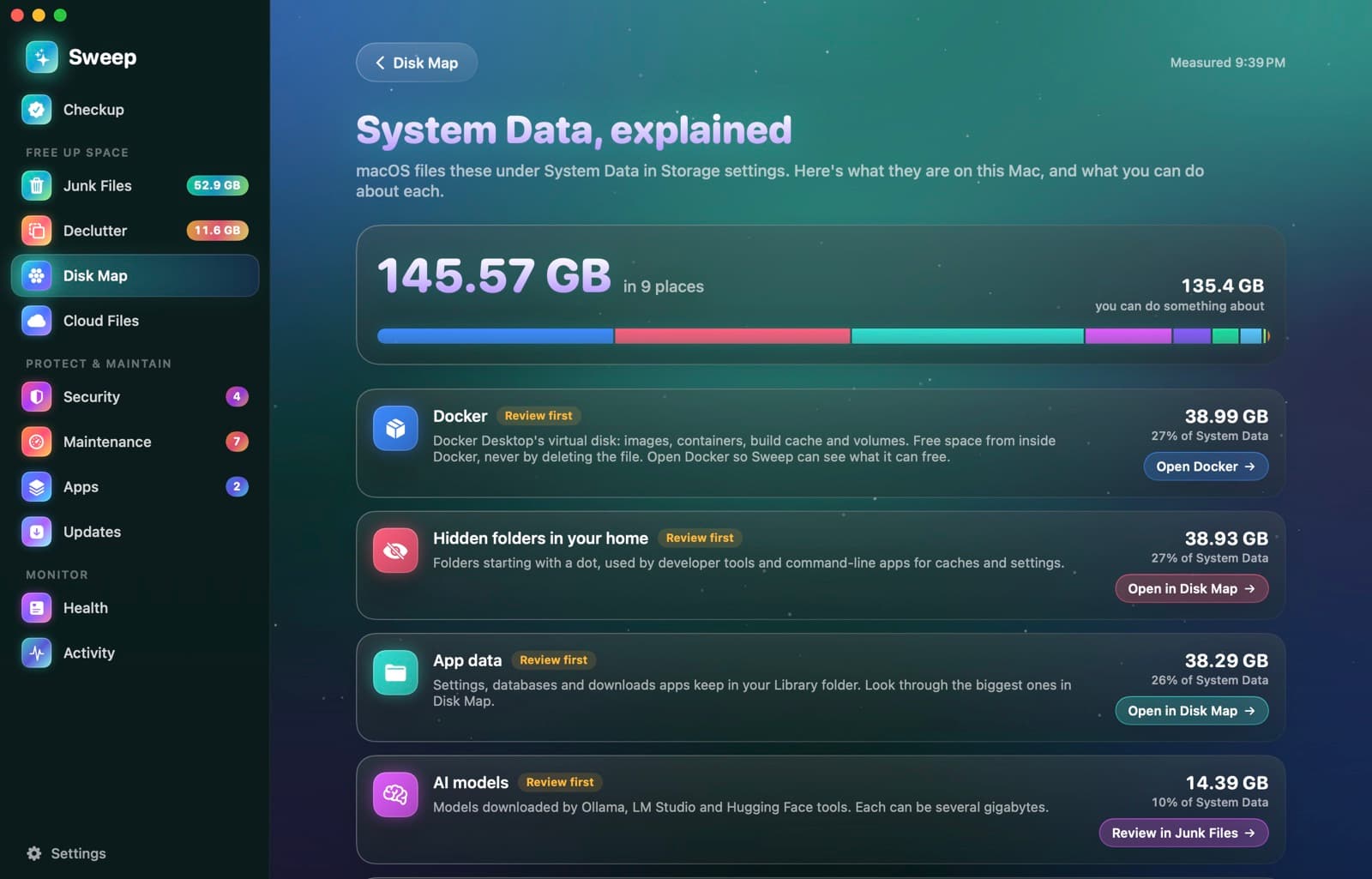
Ten parts, each with a plain explanation
Purgeable space
Managed by macOSLocal Time Machine snapshots and caches macOS frees by itself when an app needs the space.
Virtual memory
Managed by macOSSwap files and the sleep image. They shrink after a restart.
Caches and temporary files
Safe to cleanCopies apps keep so they open faster. Apps rebuild them.
Logs and crash reports
Safe to cleanRecords of what apps and macOS did. Only useful when troubleshooting.
AI models
Review firstModels from Ollama, LM Studio and Hugging Face tools. Each can be several gigabytes.
Docker
Review firstDocker Desktop's virtual disk. Free space from inside Docker, never by deleting the file.
Developer files
Review firstXcode build products, simulators and device support files.
iPhone and iPad files
Review firstDevice backups and software downloaded to restore them.
App data
Review firstSettings, databases and downloads apps keep in your Library folder.
Hidden folders in your home
Review firstFolders starting with a dot, used by developer tools and command-line apps.
From a mystery number to a plan
- 1
Open it from Disk Map
System Data, explained measures the usual contents of System Data on your startup disk. It only reads.
- 2
See each part
With its size, its share, and a label: managed by macOS, safe to clean, or review first.
- 3
Act in the right place
Each part links to where you can act: Junk Files, Disk Map, or the app that owns it.
Why the total can differ from Storage settings
Without Full Disk Access, some app data can't be measured, so Sweep's total can be lower than the number macOS shows.
System Data questions
Something else? Ask us.
Works well with
Disk Map
A live bubble map of any disk or folder: the bigger the bubble, the bigger the folder. Hover for details, double-click to go inside, and remove what you don't need, with a log of every item.
ExploreDocker cleanup
Sweep asks Docker what it can free: build cache, unused images and stopped containers. It cleans them with Docker's own commands and never touches volumes.
ExploreLocal AI models
Sweep lists the models you downloaded with Ollama, LM Studio and Hugging Face tools, with their size and date. It points out the same model kept by two apps, and removed models go to the Trash.
Explore
Clean, protect and understand your Mac.
Finds junk, big files and leftovers, checks for malware and risky settings, keeps apps updated, and shows what your Mac does when you're not looking. Free and open source.